Tuesday, November 17, 2026

SpeedCrunch 1.2.0 is out

It starts much faster on Windows, even with lots of saved tabs.

You can now set your own keyboard shortcuts and switch between Classic, Modern, and Hybrid looks in one step. You can also choose what happens when you launch SpeedCrunch while it’s already running: bring an open window forward, open a new one, or add a tab.

This release also fixes issues with unit calculations and number input, and adds a FAQ to the user manual.

Thanks to everyone who tried the pre-releases, made suggestions, reported bugs and sent feedback!

Download and read the full release notes.


Tuesday, October 20, 2026

SpeedCrunch 1.1 released

SpeedCrunch 1.1 is available for Windows, macOS, and Linux. This release brings new ways to work with sessions and constants, along with fixes for everyday editing and window behavior.

Private tabs let you work without automatically saving their calculations. Their contents are discarded when closed, and they are not restored on the next launch. You can also choose to open a private tab at startup or keep a private session as a saved one.

For those who prefer a more compact interface, Classic appearance options are available for the input area and keypad. Menus, panels, and the status bar can each follow either the system appearance or the selected SpeedCrunch theme.

Constant insertion is now searchable. Press Ctrl+Space, type a name or unit, and insert a result using the keyboard or mouse. The new nth-root function also handles negative values and quantities with units.

Several editing behaviors are configurable. You can disable automatic input adjustments, accept autocomplete suggestions with Enter, clear input with Escape, or use a steady cursor. Input digit grouping has also been restored.

The release fixes undo and redo, copy and paste, floating-panel restoration, and crashes while typing in long expressions. Other improvements include better input sizing across fonts, correctly positioned live previews, and clearer themed menu icons.

A portable macOS ZIP package is also available, keeping settings and sessions in a folder beside the app.

Download SpeedCrunch 1.1 and read the full changelog

Thank you to everyone who contributed code, reported problems, tested changes, or helped shape this release.

Sunday, October 04, 2026

SpeedCrunch 1.0 released

SpeedCrunch 1.0

SpeedCrunch 1.0 is available now for Windows, with installer and portable ZIP packages, and for macOS, with an Apple Silicon-only DMG. We hope to have an official 1.0 package on Flathub soon for Linux users.
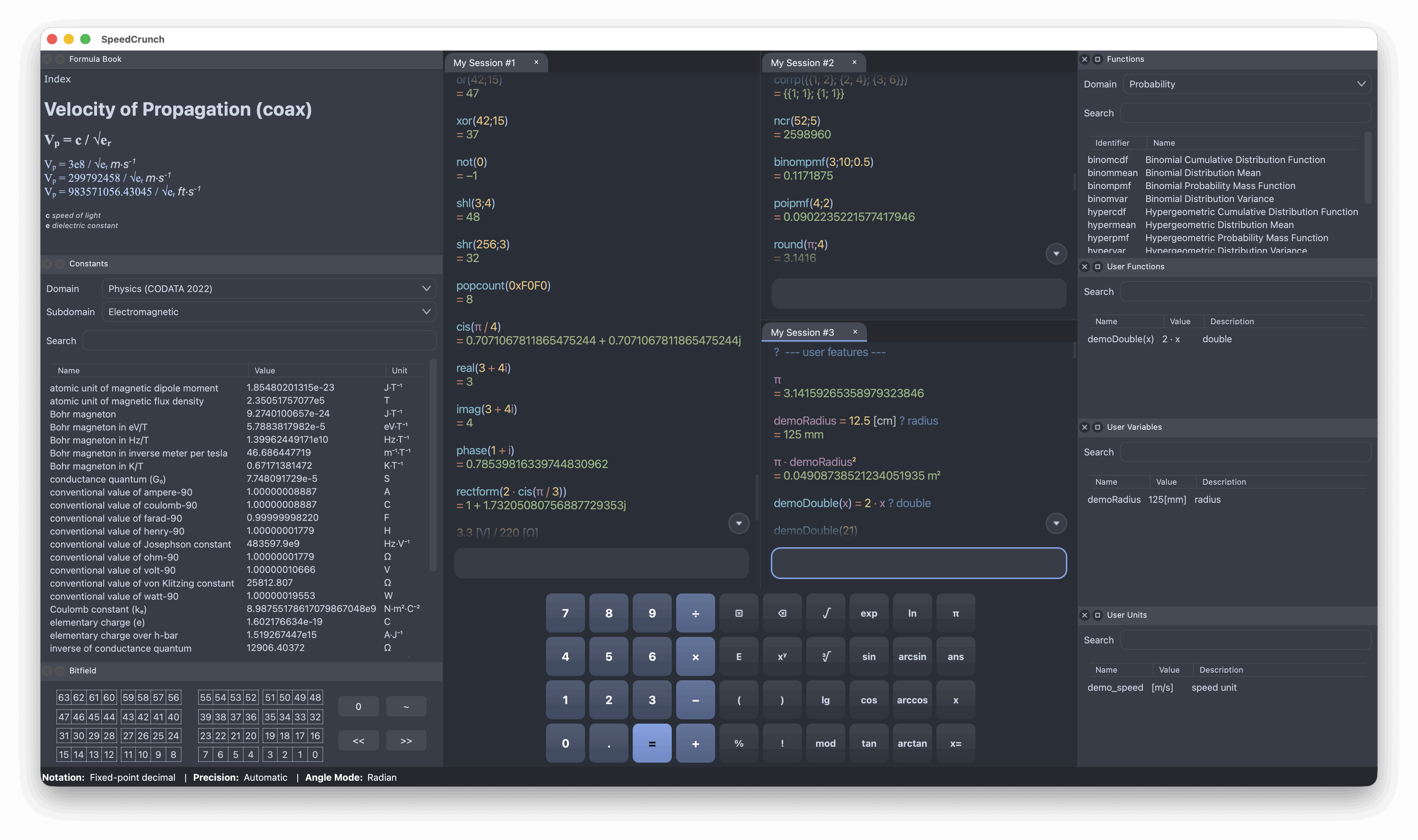
SpeedCrunch screenshot

Before upgrading: back up any sessions you want to keep.

This version introduces a completely new session system and file format, so sessions from previous releases won't be loaded. In your current version, use Session > Save to keep a backup, and Session > Export > Plain text to save a readable copy of your calculations. You can then recreate your sessions in 1.0 by pasting the expressions into the editor. See the session export instructions for details.

The unit syntax has also changed. Units now go in square brackets, for example 10[m], so expressions using the old syntax will need adjusting.

You can find a summary of the main changes since version 0.12, released in 2016, on the download page.

A few highlights:

  • Keep multiple sessions open across tabs, split panes and separate windows.
  • Sessions are saved automatically and easy to back up.
  • Edit an earlier calculation and recalculate all the expressions below it.
  • Work with lists and matrices, with new statistics and linear algebra functions.
  • Use a much improved unit system.
  • View results as fractions or in several formats at once.
  • Choose from more built-in themes or create your own.
  • A new logo.

This release includes many fixes and features requested over the past 10 years, but it isn't perfect, and development doesn't end here. As more people start using it, the community will no doubt find bugs and suggest improvements. The plan is to release new minor versions (1.1, 1.2, etc.) every 4 to 12 weeks, depending on the app's stability and demand for new features.

For developers and package maintainers: the official Git repository is now hosted on GitHub. The Bitbucket repository is obsolete.

Unfortunately, the entire issue tracking history was lost because Bitbucket did not give a final warning before shutting down its Issues platform. If you previously reported a bug or requested a feature that still needs attention, please submit it again on the GitHub issue tracker or any of our communication channels. Translation corrections are welcome too, as is feedback on any other part of the app.

Thank you to everyone who has contributed over the years, whether through code, translations, bug reports or suggestions.

Tuesday, November 29, 2016

SpeedCrunch 0.12 Released

Almost 3 years and 700 000 downloads later, here's the core new features of this release:
If you're curious, check out the complete list of enhancements and bug fixes. Or go straight to the downloads page. For better productivity, learn about all the user interface quirks at your disposal.

MacOS users: please note that a download is not yet available for you. If you can help us with that, please get in touch. (download is now available, thanks to Samuel Gaist).

Don't forget to report issues or request new features in our tracker. See more ways to contribute in the Help menu on the new website. Please help us release 1.0 as quickly as possible. Have a look at what's planned already.

Massive thank you to Teyut, Pol Welter, Felix Krull, Hadrien Theveneau, l.inc, all the translators at Transifex, and the folks over at Portable Apps (for representing a nice chunk of our user base).

Cheers

Thursday, January 30, 2014

SpeedCrunch 0.11 released

It's not dead yet. It's now been over four years since the release of 0.11 alpha and it couldn't unfortunately have been any different. But today I'm finally able to offer you the minimum feature set and quality that you've been waiting for.

Oh-Eleven brings you syntax highlighting on the result display, predefined color schemes, instant function usage help, digit grouping (thanks, Tey), new languages, a slightly redesigned formula book with new sections, lots of visual perks, and a new icon (by yours truly, who decided to take an adventure in vector graphics). You can now include comments in the expression - everything after a question mark (?) will be ignored and highlighted differently. Finally, bot comma and dot are now accepted as radix characters. Check the complete closed list of enhancements and defects.

Now for some bad news for some of you: the virtual keypad is gone. The reason for this is that it goes against the SpeedCrunch philosophy and main goal - to be a keyboard-oriented, fast to use scientific calculator. The old keypad was both ugly and not very functional. I'll consider re-adding a keypad in the future IFF a significant user base asks for it and a good and scalable design is found. I see this feature in the same category and usefulness as RPN support.

I'm already thinking about 0.12 (or 1.0) and the features that should have priority. One of them is the long awaited ability to define user functions. Thanks to Tey, we're getting there and it will certainly be available in the next version. But for now, I hope you'll enjoy and find this release useful. Grab your Windows or OS X package from the usual place, which has just been heavily revamped. Linux users will have to wait for their distribution to update their included version.

Would like to help the project? You can translate it, file a feature request or bug you found, or contribute with source code.

Thursday, November 05, 2009

SpeedCrunch 0.11-alpha released

It's long long due, but I finally got a small amount of available time to release this test version. If the term alpha does not ring a bell for you, please be aware that it might contain numerous bugs.

Although it should function quite well for the majority of users, the goal of this release is precisely to give people a new version to play with and report back the issues encountered during usage.

You can give us feedback through our mailing list, but if you are sure about the existence of a bug, please fill it on our bug tracker.

I apologize for the lack of a proper and up-to-date change log, but you can check most of the changes here. And these are the issues still to solve and targeted at final 0.11.

For the many people who requested business-oriented built-in functions, sorry for not having worked on it yet. I haven't forgotten about it though. Will try to include them for the final 0.11, but can't promise. Also, there are some old requests still not implemented in this version, so if your particular wish matches that case, I'm sorry for that.

Like usually, contributors of any kind are more than welcome to help this project (developers, translators, testers, etc). Please feel free to participate in our mailing list or contact me directly.

Special thanks to Alessandro, Andreas, Ariya and Wolf, who help me in keeping this project alive despite the slow progress in the past year.

Only the links are missing:
  • Installer for Microsoft Windows
  • Portable Edition for Microsoft Windows
  • Apple Mac OS X Universal application
  • Source code tarball

  • I hope that the new features, user interface tuning and new translations please you, as well as the bugs fixed. If not, please let us know your thoughts.

    Happy crunching!

    Monday, October 20, 2008

    SpeedCrunch Success as a Portable App

    SpeedCrunch has a Windows Portable Edition (as in "carry-with-you" or "no-installation-needed") since version 0.10. The lastest release, 0.10.1 (May 24), has a Portable Edition download count of almost 11000 as I write this (source).

    But since August 22, our fellow folks at PortableApps.com have incorporated SpeedCrunch in their distribution (page). This is absolute good business for us, since the download count is at this moment a bit above 47000 (source).

    This is quite impressive and gives SpeedCrunch yet another boost, since it basically doubles our Windows (installable and portable together) download rates for 0.10.1. A big thank you to portableapps.com!